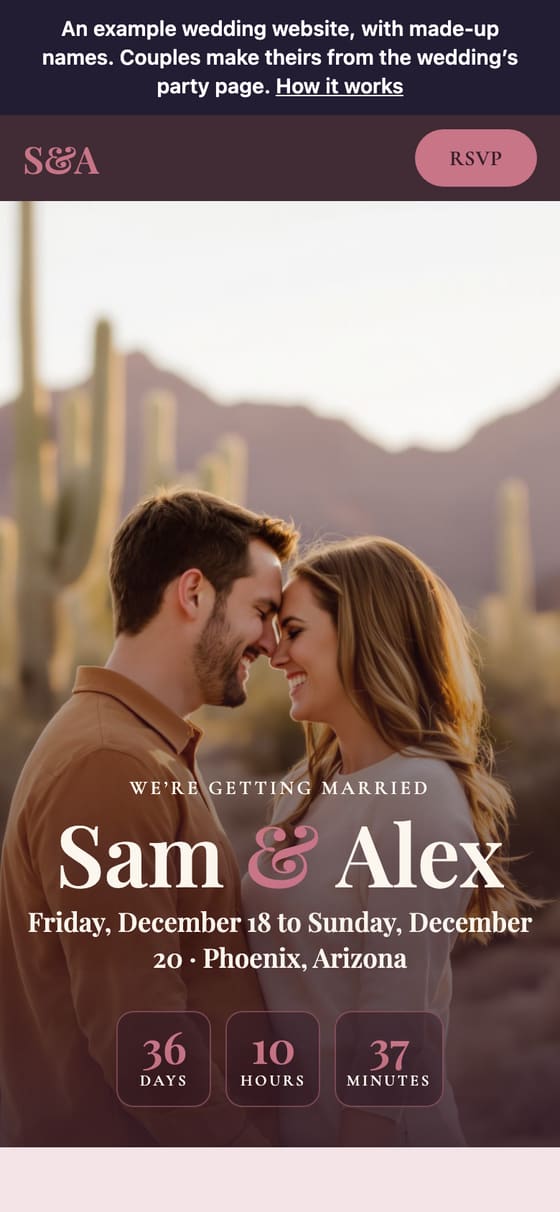
Your story, every event of the weekend, where to stay, the registry and the answers to everyone’s questions, on one page at letsparty.rsvp/your-names. It’s made from the same parties and guest list as your invitations, so a guest who comes from their invitation sees their own events, their answer and their table.
Every website starts with these sections, in an order you can change, and each shows only once it has something in it. See them all filled in on Sam & Alex’s example website.
The top:your names over a photo of the two of you, the date, where it is (“Sedona, Arizona”) and a countdown in days, hours and minutes. A bar stays at the top with your initials, the sections and an RSVP button.
Our story:how you met, the proposal, what’s ahead, as long or as short as you like.
The wedding party:who’s standing up with you, each with a photo, their role and a line about them.
Photos:up to 20, with captions; guests tap one to see it large.
The events:each party’s date, time, place, dress code and plan for the day as a timeline.
Travel:anything else about getting there and staying, in your own words.
Things to do:your picks nearby, for guests who come early or stay the weekend, in groups like Food, See and Shop.
Registry and links:up to six buttons, starting with the links already on your invitation, and a cash fund button for your own Venmo, PayPal or Cash App. Still choosing a registry? Every registry, compared.
Questions:“Are kids welcome?”, “Can I bring a date?”, with your answers.
Find your table and the RSVP:the table once your seating chart is shown, and the RSVP always.
Sections you can add
“+ Add a section” shows what else can go on the page, as pictures. One tap adds it and opens it.
Where to stay:up to six hotels, each with its booking link, its room-block code and a note.
Getting there:a line each for flying in, the shuttle, parking and rides home.
The menu:course by course, with a line under it (“Pick your main when you RSVP”).
What to wear:each party’s dress code, a few words of your own, and the colors you love as swatches.
The venue and map:the place with a map and “Get directions”, for the guests who can see its address.
Your own words:a heading and anything else guests should know. Add as many as you like.
In your invitation’s look
The whole page takes your invitation’s colors and fonts. On a library design, each section opens under a small picture painted in the style of your invitation’s art: an open book over your story, a gift over the registry.
Most sections come in six layouts: your story as a letter or beside a photo, the wedding party in round portraits or snapshots, the hotels as cards or a list. Pick one and the website beside you shows it at once; try them all on the example website.
For a wedding weekend, “One look for everything” puts every event’s invitation and the website in the same design, and the QR sign and the printed seating chart match it.
How it works with your invitations
The website and the invitations share one set of parties and one guest list. The events on the website are your parties themselves, and a Where to stay or Getting there section already on your invitations starts the website’s, so you never type the hotel block twice.
RSVPs stay on each invitation.Each household answers on its own invitation, by name and with meal choices. Once the website is on, every invitation has an “Our website” button.
Each guest sees their own page.A guest who comes from their invitation sees their events: their answer, who’s coming, their table, the addresses and a button back. Parties left off the public page show to the guests invited to them.
Some events are for some guests.Untick a party only some guests go to, like a rehearsal dinner for family; on a wedding weekend’s website, the rehearsal dinner starts unticked.
Lost invitations find their way back.A guest types their email, and if it’s on your guest list, their own link is emailed to them. With a password, a guest with no email can type their full name instead.
Find your table.Once the seating chart is shown, a website with a password gets a “Find your table” box: a guest types their full name and sees their table, nobody else’s.
One link everywhere.Your website’s link, letsparty.rsvp/your-names, is the one your invitations, save-the-dates and QR sign use.
Make one in five steps
The website comes with the Wedding plan. The wedding website guide has every step in detail.
1. Start it from the wedding.On the wedding’s party page, tap “Website” on the Your wedding card. For a weekend (the rehearsal dinner, the big day, the brunch), the website covers every party in it, and one you made before the weekend comes along.
2. Fill in the sections.The editor lists your sections in the order guests see them. Tap one, fill it in, pick its layout and tap “Save”. On a computer the website sits beside the list, at phone, desktop or full-screen size; on a phone, switch to “See it”.
3. Add and arrange.“+ Add a section” adds more. “↑ Up” and “↓ Down” move a section, and “Hide it” takes one off the page and keeps what’s in it.
4. Add a password, if you like.Print it on your invitations or put it in the text.
5. Turn it on.It starts off, seen only by you and your co-hosts with “See it”, until you tap “Turn it on”. Then share the link.
What to put on your wedding website
Guests come with practical questions, so answer those first and keep the story short and warm.
Every event’s when and where,with the dress code for each, so nobody digs through old texts.
Travel:the nearest airport, the hotel block and its deadline, and the way from the hotel to the venue.
The questions everyone asks:kids, plus-ones, parking, an outdoor ceremony, phones during the vows.
Your registry,and a honeymoon fund if you have one, where guests look for them.
A little about you:how you met and who’s standing up with you, so guests who know one of you meet the other.
Things to do nearby,for guests who make a trip of it.
Privacy, built in
Addresses stay on the invitations.The website shows each place’s name but not its address, like a party’s public link.
A password if you want one.Until it’s typed, only your names and the date show; then the events show addresses and directions too. Guests type it once per device, and a guest who comes from their own invitation doesn’t need it.
Your guest list stays yours.The website never lists who’s invited, and the email lookup gives everyone the same reply, so it can’t be used to find out.
Out of search results.Search engines are asked not to list it, with or without a password.
After the wedding, an album
The day after the last event, the website becomes an album: your thank-you note, then guests’ photo-wall pictures and wishes if you choose to show them, then your own photos. The RSVP, travel and planning sections come off. Guests’ photos and wishes show only to guests or behind the password.
See one, fully built
Sam & Alex’s example website has every section filled in, in the same look as their invitations. It’s a sample, so try anything: nothing saves.
The Wedding plan is $149. It lasts from the day you start until three months after the wedding, however long the engagement, and moves if the date does. It covers the wedding, any party you make around it, and every other party you host until then, with no limit on invites. After that it renews as a regular Host Pass at $99 a year; cancel any time before it renews.
The wedding$149
Engagement party, if you have oneIncluded
Shower, if you have oneIncluded
Bachelorette or bachelor party, if you have oneIncluded
Not to collect RSVPs: each guest answers on their own invitation. A website helps when there’s more to say than an invitation holds: a weekend of events, travel, or the same questions from every guest.
When should a wedding website go live?
Before the save-the-dates go out, six to eight months before the wedding, so its link can go on them. Fill in the travel and the registry first, and add the rest as you plan.
Can guests RSVP on the wedding website?
They answer on their own invitations, where each household says who’s coming and picks meals. The website sends each guest back to their invitation, or emails their own link to anyone on the guest list.
Should a wedding website have a password?
If you’d like addresses to stay among your guests, yes. Print it on the invitations or put it in the text; guests who open the website from their own invitation skip it.
Is it okay to put the registry on the wedding website?
Yes, it’s the usual place for it, and where guests look first. Registry and links holds up to six buttons, starting with the links already on your invitation.
Can I use my own domain?
Your website’s address is letsparty.rsvp/your-names. If you already own a domain, like samandalex.com, you can forward it to that link from wherever you bought it, and anyone who types it lands on your website.
What happens to the website after the wedding?
The day after the last event it becomes an album: your thank-you note, guests’ photos and wishes if you choose, and your own photos.
We use Google Analytics to see which pages help people plan their parties. It only runs if you say yes. Privacy