Guide 12 of 21
Send invitations in Spanish
The invite, its opening, the texts and the emails in Spanish, for the whole party or one household, and a switch for every guest.
letsparty can speak Spanish to your guests: a quinceañera for a family that reads Spanish, a wedding with grandparents who do, or a birthday where half the guests prefer it.
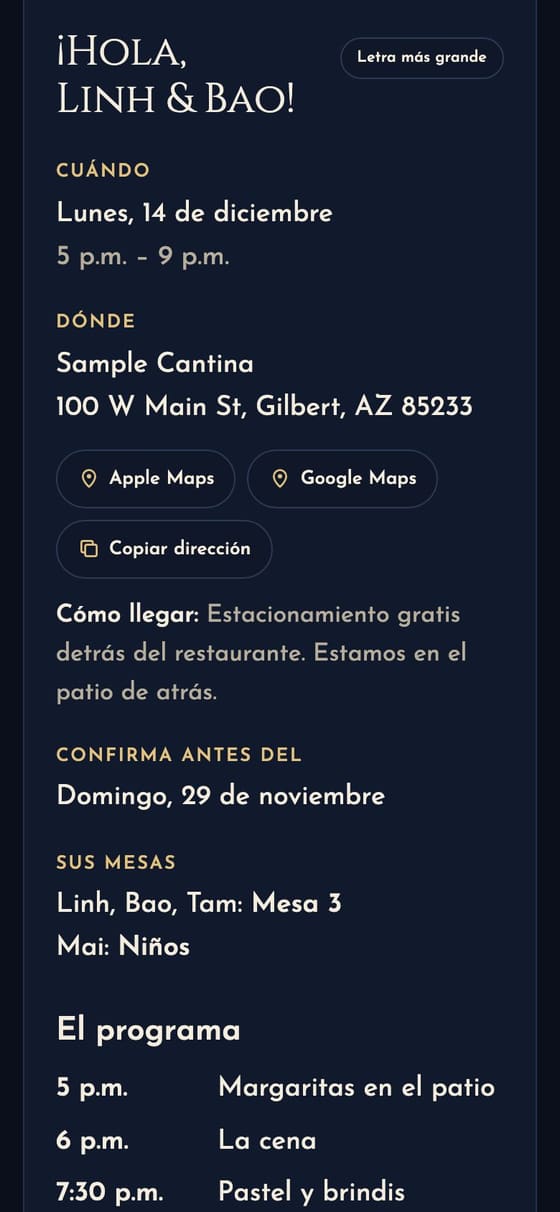
For the whole party
In Edit details, under Details and RSVP, set Language guests see to Español (the planner asks on its last step, The words). Then everything letsparty itself says to a guest is in Spanish:
- the envelope or opening (“Recibiste una invitación”, “Toca para abrir”) and its postmark;
- the line over your design’s title and the date on the card (“Sábado, 5 de diciembre”);
- the invite’s labels, the RSVP form and its answers (“Sí, ahí estaremos”), the bring list and every message after they answer;
- the invite text from your phone, the invite email, the nudge and the reminder, and the copy of their answer.
What you write yourself shows as you typed it: the party’s name, the details, the schedule, a greeting or thank-you line of your own. For a party all in Spanish, write those in Spanish. Your own alerts about RSVPs stay in English. Your own RSVP question and answer buttons show in Spanish once you translate them on Your words in Spanish; until then a Spanish invite keeps letsparty’s Spanish ones.
For one household
For a mixed guest list, leave the party in English and open each household that reads Spanish in the Address book: set Invites in to Español. Their invite, texts and emails come in Spanish; everyone else’s in English. It works the other way too: a Spanish party with one household set to English.
Your own words in Spanish
For a mixed guest list, give the households who read Spanish your words in Spanish too. On the party page, open More → Your words in Spanish: each thing you wrote is there in English, beside a box for the Spanish (the party’s name, the details, parking, what to wear, the plan, the lines after an RSVP, what to bring, your link buttons). With the AI helpers on, Draft the Spanish writes a first draft for you to read and change; nothing reaches guests until you tap Save. A box left blank stays in English.
Households who read Spanish then see your Spanish on their invite and in their emails and texts; everyone else sees your English. If you change the English later, that line goes back to English for Spanish readers until you update it, so nobody gets an old time or place; the page marks it English changed. See it as a Spanish reader shows the result. Meal choices stay as you wrote them, so the answers all count together.
Guests can switch
Every invite has English · Español at the bottom. A guest who taps it sees the invite in that language, and their phone remembers the choice for every invite after.
Check it before you send
Preview invite shows the invite in the party’s language, and the language picker in Edit details switches the preview beside it as you choose. A few of the novelty designs keep their English jokes on the card itself; the invite below the card is still in Spanish.
Next guide Make a wedding website →