Guide 16 of 21
Make a seating chart
Add tables, seat each household (the kids can sit apart), print the chart and the list for the door, and show guests their table.
The seating chart lives on the party page, under More → Seating chart. It works for any party with tables: a wedding reception, a 70th birthday dinner, a gala.
Add your tables
Under Add tables, say how many and how many seats each: ten tables of eight is a common start for 80 guests. One table with a name (“Head table”, “Kids”, “Sweetheart table”) gets that name; more than one are numbered, carrying on from the last number you used. Edit table renames one or changes its seats; removing a table sends its guests back to Not seated.
Seat each household
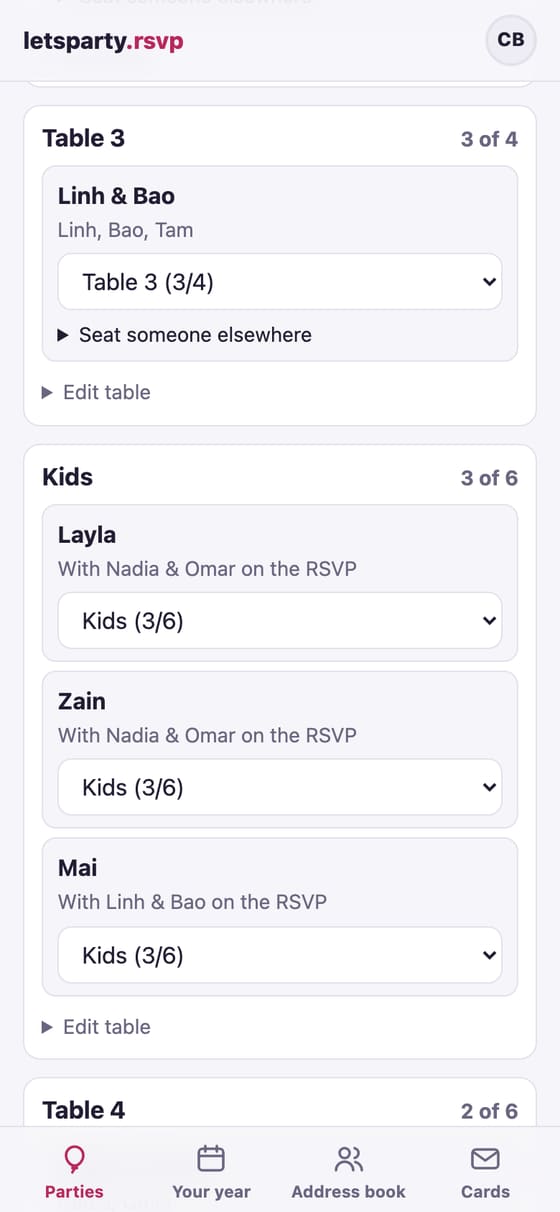
Everyone who said yes starts under Not seated, with who’s coming (by name, when your party asks for names) or how many. Pick a table from the list under each household and it moves there; on a computer you can also drag a household onto a table. Each table shows how many are seated against its seats, and one with more people than seats is marked.
Households who haven’t answered yet are folded away under Haven’t answered. You can seat them now; they count as their whole household until they answer.
Seat someone apart from their household
A household that answered with names has Seat someone elsewhere: pick a different table for one person (the kids’ table, Grandpa at the head table). They show on that table as “with” their household, and moving the whole household to the same table brings them back together.
Print it
- Print the chart: a box for each table with who sits there, for you and the venue.
- Print the list for the door: everyone in A-to-Z order by last name with their table, for a board or an easel at the entrance.
Both print in your invitation’s type and colors. Check-in at the door and the guest-list spreadsheet show each household’s table too.
Show guests their table
When the chart is ready, tap Show guests their table. Everyone who said yes sees Your table on their own invite, under the date and place (each person’s, if someone sits apart). Turn it off again any time with Hide it from guests.
With a wedding website that has a password, guests can also type their first and last name there under Find your table and see their table, and nobody else’s. Without a password the website tells them their table is on their own invite, so it never searches your guest list for strangers.
Next guide Nudges, reminders and updates →