Guide 20 of 21
Plan your year
Birthdays from your address book and the holidays you host, laid out twelve months ahead, with reminders.
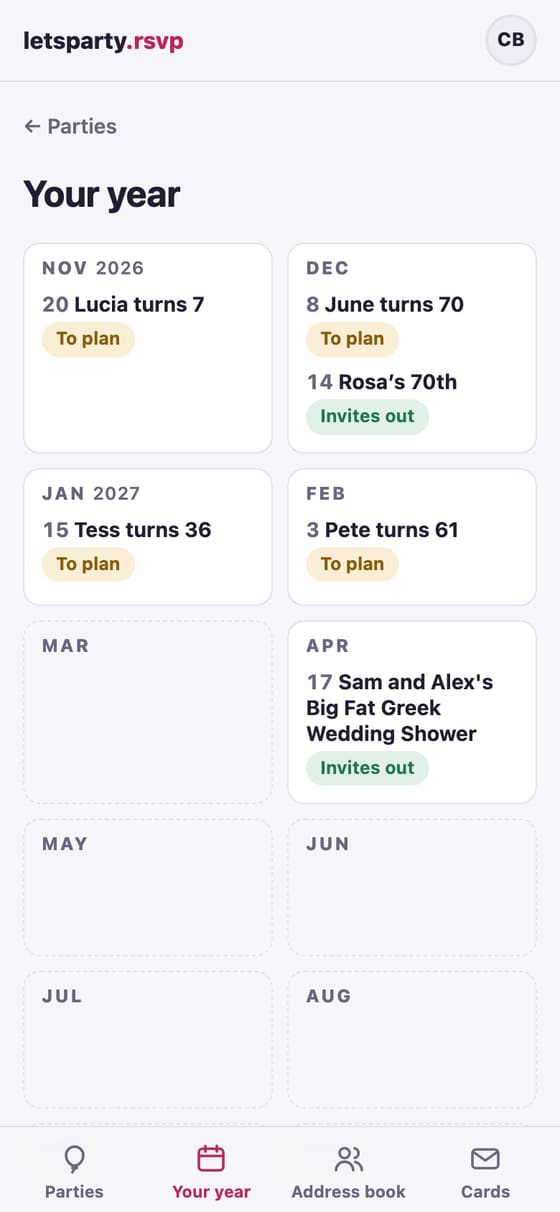
Your year lays out the next twelve months: the holidays you host, the birthdays in your address book, and every party you’ve planned.
1. Pick what you host
On Parties, tap Your year → beside Coming up this year. Under What you host, tick the holidays (Thanksgiving, a holiday party, Easter, Diwali, Lunar New Year and more), then tap Save.
2. Add birthdays
On anyone in the address book, fill in Birthday: “Mar 14”, or “3/14/2019” with the year. With the year, the calendar shows the age they’re turning (“Rosa turns 70”), and milestones like a 40th or a 70th get a milestone party.
3. Turn on reminders
Tick Email the group’s owners when it’s time to plan and save. Owners hear about four weeks before a holiday. For a birthday, tap Remind me yearly on it: you’ll hear six weeks ahead, or ten for a milestone.
4. Draft it in a tap
On any occasion, Draft it makes the party with the date, the words and a design, and opens the planner so you can check each answer. If you drafted the same occasion here last time, last time’s guest list comes along. Not this year? Skip this year (and Skipped · undo brings it back).
Party Radar (optional)
Under Party Radar, paste your calendar’s private link (the page says where to find it in the common calendar apps) and tap Save. letsparty finds birthdays to plan and weekends that are free, and offers your free Saturdays when you pick a party’s date. It keeps busy dates only, never what’s on them, and it only suggests: nothing goes out on its own.
Next guide Helpers: group-chat RSVPs, “Write it for me” and answers for guests →